How We Add AI to Software You Already Use — Without Rebuilding It
AI AI & ML developmentSummary
Your CRM, ERP and apps do not need replacing. They need a layer that can reason over data they already hold. We read through an API or a database connection, leave the current screens in place, and refuse the work on the first call if there is nothing we can reach.
The question I hear on the first call is almost always the same. Do we need to throw out our software and start over with AI?
A distributor in Pune, still on Zoho and Tally. A clinic on an appointment system we shipped years ago. A freight desk whose real operating system is a WhatsApp group. Someone has told each of them that AI means a new platform.
Almost always, the answer is no. The software is not the gap. The gap is that it already holds the data and cannot reason over it. You do not replace a CRM because it cannot answer “which clients have not paid in 60 days?” You add a layer that reads what is already there, and you leave the screens alone.
Why the rebuild instinct is wrong
The instinct is reasonable. If the product cannot do the new thing, buy or build one that can. The mistake is treating “cannot answer a question” as “cannot do its job.” The CRM stores accounts and the note after a call. The ERP posts vouchers and the return your CA expects. The portal shows orders. Those jobs did not get worse because a language model exists. What changed is that the same records can be asked a question without an export to Excel.
A rebuild bills you for the wrong problem. The projects I have watched stall cost six months, a retraining of people who already know the screens, and a migration in which “we will move the history” becomes “we will move last year.” Between the two, the old system is frozen so the numbers will match, and the new one is not yet trusted. Invoices still go out. A GST deadline does not move because a cutover slipped.
A rebuild is also hard to undo. Moving the team back is another migration. A layer is not. If the first use case is wrong, we switch the service off and Monday looks like last Monday. There are cases where the software itself has to change, and we wrote that decision up in custom software vs off-the-shelf. If the data is reachable, a layer is still the default.
What a layer actually means
A layer is a set of AI services sitting beside the systems you already run. Those systems stay up. They read through a surface that already exists. A documented API is the clean case. A database with a read-only user is the usual one, when the product is older or the vendor’s API skips the tables that matter. The other direction is a webhook or a short poll: something happens in the CRM, we hear about it, we do the work, we write a field or a draft back.
On the first call we draw three bands. Existing systems on top, untouched: CRM, ERP, database, web app, mobile app. The AI layer in the middle: search over your data, agents for a multi-step task, classifiers that score and route, copilots on a screen. Under that, the same team, the same screens, the same data. The person raising an invoice still raises it where they did last Tuesday, sometimes with fields already filled.
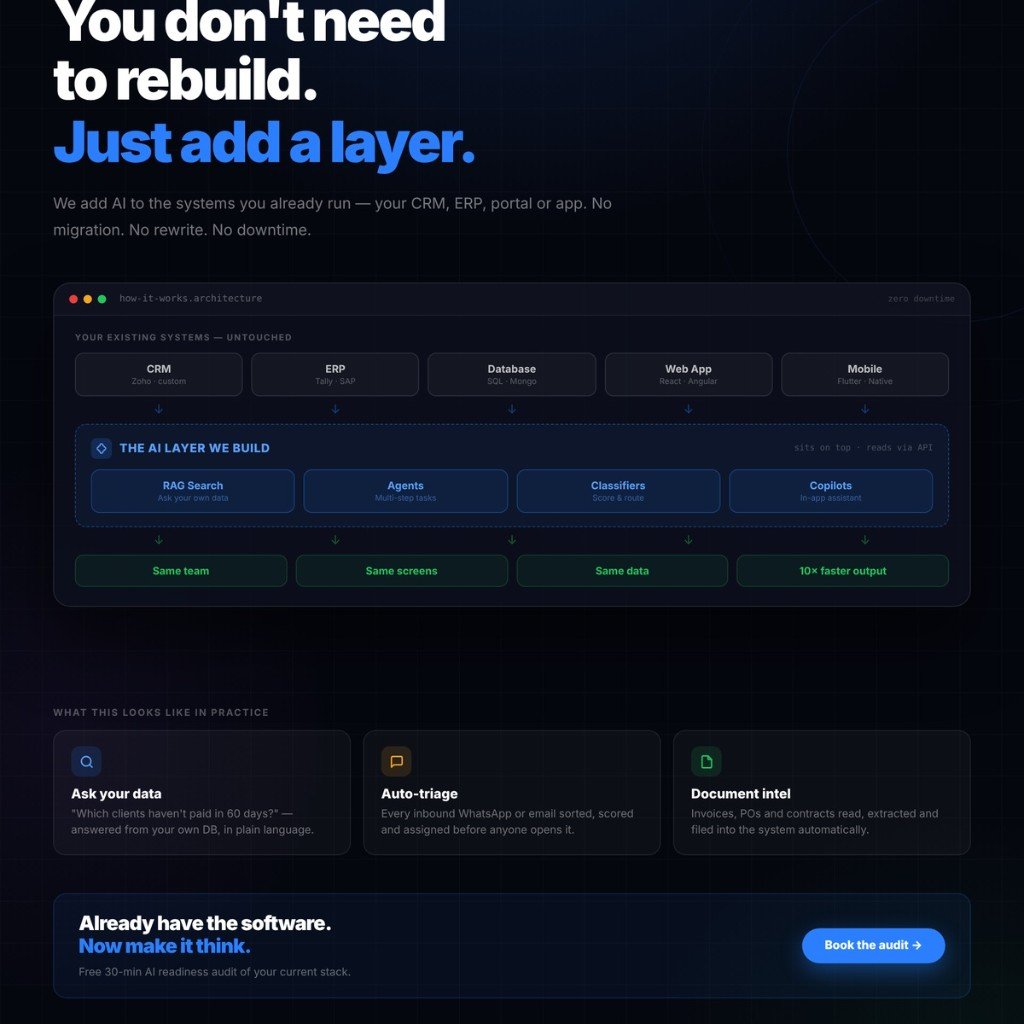
There is no downtime because we are not swapping the database and we are not changing DNS. The current app keeps serving traffic while the layer sits next to it. A missing webhook is a small release at the boundary, not a weekend with the business closed. The layer sees only what the system will show, and writes only what it will accept. A status that lives in someone’s head, or a desktop screen whose only export is a scanned PDF, has nothing to attach to. We say so before a proposal.
The four patterns we build
Most of what we build is one of four patterns, sometimes two.
Ask your own data
Retrieval-augmented generation is how someone asks their own records a question. The model does not memorise the books. It searches at question time, answers from the rows or documents it found, and points at the source. Tomorrow’s data changes tomorrow’s answer. You do not retrain.
A trading firm in Chennai kept five years of orders in SQL behind their portal. The Monday question was which clients had not paid in 60 days, and who had promised a follow-up. Both facts were already in the orders table and a notes column. The owner types it and gets a list. The choice against retraining a model is the one in RAG vs fine-tuning. The failure mode is an empty notes column: the service should say it does not know. A confident paragraph with nothing behind it gets forwarded to a client.
Auto-triage and classification
WhatsApp, email, a shared mailbox. A logistics operator in Nagpur ran dispatch from one WhatsApp group, drivers and customers in the same thread. A missed message was a missed trip. We classify each inbound message as a pickup, a delay, a payment or noise, score it, and write it into the trip system they already used.
Below a confidence threshold the dispatcher sets, the message waits for a person and does not move a truck. I will not ship an automatic reply to the customer. A wrong pickup time costs more than a minute of checking, and a demo that answers even when it is unsure is not triage.
Document intelligence
Supplier invoices at a manufacturing shop in Pimpri arrived as PDFs and were retyped into Tally: GSTIN, HSN, taxable value, PO number. The mismatch showed up at month end, which is the expensive moment to find it. We read the file, match the open PO, and file a draft voucher in the system they already post from. A person approves it.
We do not auto-post a tax document. A wrong GSTIN costs more than the review. A photo of a crumpled challan drops lines, so we reject the file instead of inventing a line that happens to add up. A field we cannot read stays blank.
In-app copilots
This is the pattern people ask for, and the one we ship last, on the screen the team already has open. Same login, same record. A sales team we look after gets a WhatsApp draft on the deal screen, drawn from the last notes and the open quote, in the English and Hindi that rep actually sends. They edit it and send it.
It fails on a thin record. If the note says “called client,” the draft is vague and the panel is ignored. A larger model does not fill a field nobody uses. We say that before we build the panel.
What this requires from you
We need an API, or a database we can reach. Read access proves the first use case. Writes come later, on named fields, each one audited. If the published API skips the tables that hold the data, a read replica with a locked-down user is normal. We name those tables before we ask for a password. We will not take a shared admin login and explore.
A 2009 desktop application with no API, no database we can open, and nothing beyond print-to-PDF will not work. I have turned that down. Scraping the screen breaks when a button moves. The honest path is an export, or replacing that one system, and that is a different project. We would rather say so on the first call than in week six.
What goes in is what comes out. Payment status kept in a notebook and typed into the CRM on Friday means Wednesday’s answer is a confident mistake. A bigger model will not fix it. We check how fresh the fields are, how often they are null, and whether two systems disagree about the same customer. A bad feed is the first milestone. We also need one operator who can say when an answer is wrong. Without that person we can ship the service and we cannot tell you if it is any good.
How we scope it
The AI readiness audit is thirty minutes. You leave with a written note, not a slide. We look at which system actually holds the data, whether we can reach it without a migration, what a real sample looks like, including the bad rows, and which of the four patterns removes a weekly chore.
The note names the first use case, how we would connect, what we would refuse to automate, a range for the build, and a no if you should not start. Take it to another vendor if you want. Once the use case is real, we scope the build the same way as the rest of our AI and machine learning work: a written range, then a phase you can stop. The stages and the refusals are the same ones in how every project is run.
Frequently asked questions
Do we have to replace our CRM or ERP to add AI?
Almost never. If the system already stores the data and exposes an API or a database we can reach, we add a layer beside it. The screens your team uses stay in place.
What if our software has no API?
A reachable database with a locked-down read user is a normal path. A desktop application with no API, no open database and no export beyond print-to-PDF is not. We say so on the first call.
Will adding an AI layer take our system offline?
No. The existing application keeps serving traffic. The layer is deployed beside it and reads through an API or database connection. We are not swapping the database or cutting over DNS.
Book a 30-minute AI readiness audit
If the CRM, ERP or portal already runs the business, you do not need a new one to start. Call +91 70574 44454, or tell us what you run today on the contact page. We will tell you on that call whether a layer will work. If it will not, we will say that too.
Book the audit AI & ML developmentRelated articles
-
 RAG vs Fine-Tuning: Which Should You Choose?
When retrieval wins, and when changing model weights is the actual job.
-
 Custom Software vs Off-the-Shelf
When a rebuild is the right call, and when the software you have is enough.
-
Need a clear quote?
Tell us what you are building — we reply within one business day.
Free consultation